For Birth Doulas
A Contraction Timer for Doulas
Sivan Potash
Birth Doula & Childbirth Educator · Updated 28 September 2026
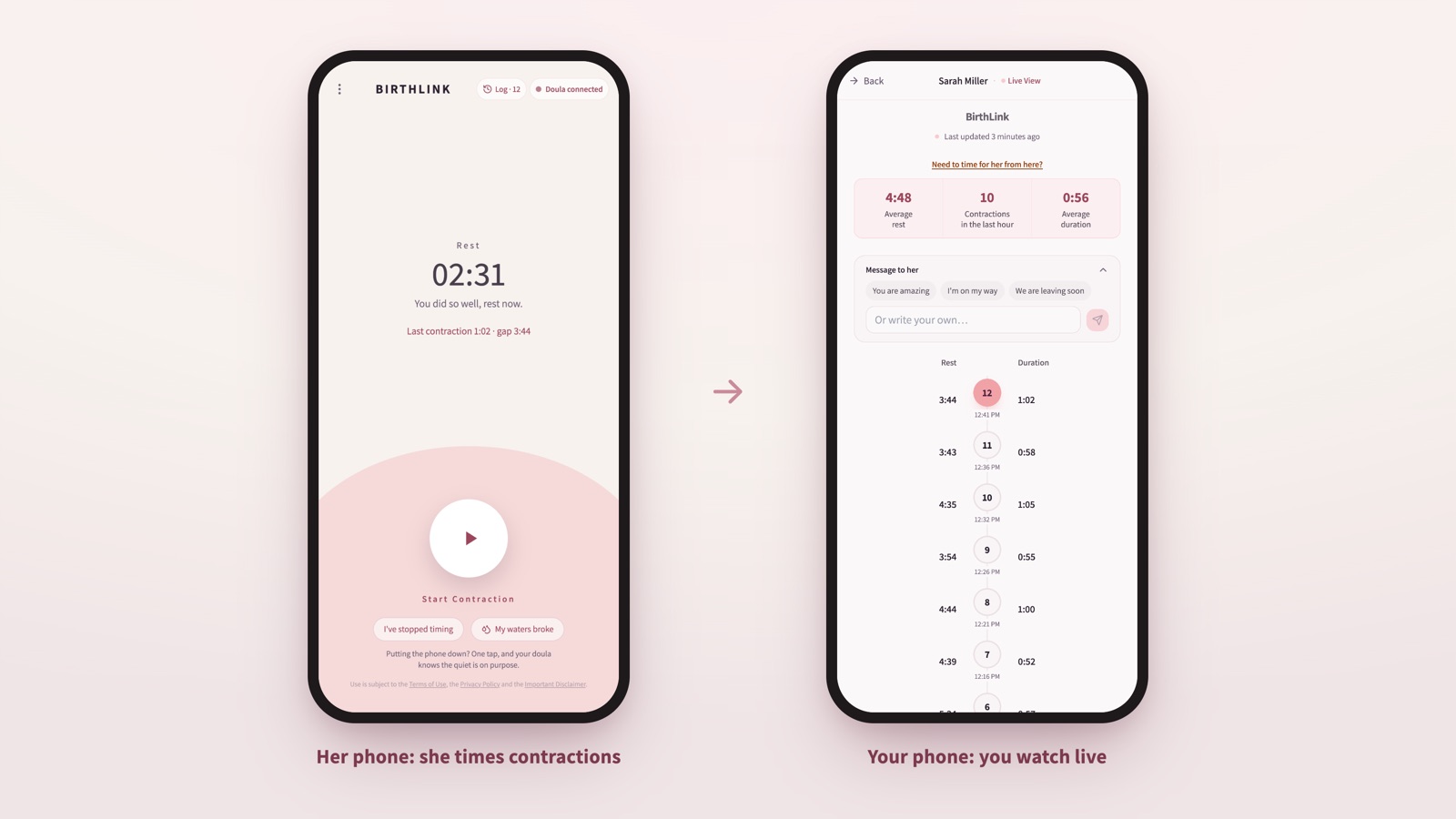
A contraction timer for doulas is one where the client does the timing and the doula sees the result as it happens. Your client opens a link on her phone and taps at the start and end of each contraction. On your phone you see each one arrive: how long it lasted, how far from the last, and whether the pattern over the past hour is tightening or drifting apart. She downloads nothing and creates no account. That is what BirthLink does, and this page explains how it works, what you actually see, where it fits in a doula’s night, and what it costs.
I built it because I am a doula, and for years my early-labor evenings looked like everyone else’s: a screenshot at 11:40, a voice note at 12:15, “they’re about six minutes apart I think,” and me trying to work out from three fragments whether to get dressed. I have lost count of the nights that went like this. Her partner sends a photo of an app screen, I zoom in to read the numbers, I ask when the last one was, and by the time he answers there has been another one. Nobody is doing anything wrong. The tool just was not built for two people.
Why a regular contraction timer is not enough for a doula
Almost every contraction app is built for one person: the woman in labor. It does its job well. It times, it averages, it tells her when she hits five-one-one. Then it stops, because it has no idea that someone else is waiting for that information.
So the information travels the only way it can. She screenshots the app and sends it to you. Or her partner reads numbers out over the phone. Or she types “getting stronger” and you have to decide what that means.
Three things go wrong with that, and every doula has felt all of them.
First, a screenshot is a moment, not a pattern. Five contractions at 12:10 tell you what happened at 12:10. They do not tell you whether the next five are closer together, and closer together is the whole question. I wrote a separate piece on this: why doulas need more than contraction screenshots.
Second, every update costs her something. A woman in latent labor who has to report to you every twenty minutes cannot rest, and her partner spends the night being a secretary instead of holding her.
Third, the gaps are where the doubt lives. Between one message and the next, you are guessing. Guessing is tiring, and it leads to the two mistakes doulas make in early labor: arriving hours too early, or arriving late.
How a shared contraction timer works
The idea is simple: one timer, two screens.
- 1
You send a link. From your BirthLink dashboard you create a private link for each client. It works only for her.
- 2
She opens it and times. In her phone's browser, not an app. Tap once when a contraction starts, once when it ends. If she mistimed one, she can fix it; if she forgot one, she can add it.
- 3
You see it live. Each contraction appears on your phone as she records it: duration, interval, the recent trend, and a count for the hour.
- 4
You can also be notified. BirthLink can tell you when she starts timing, when she stops, when she starts again, and when her waters break. Notifications are one more way to know, not a replacement for staying in touch: they depend on her phone and yours, so agree with her before labor how you will reach each other.
- 5
You can time for her. When she is deep in it and tapping is the last thing she wants, you can run the timer from your side while you are on the phone with her, or once you arrive. Kira, a doula in Indiana, asked for this at a home birth. Once she arrived, she wanted to keep timing herself, so the family could stop watching the clock and she would have the pattern in front of her when it was time to call the midwife. In her words: “I don't want her or her husband to worry about timing, so it's been super nice to be able to time for them.”
There are also a few small things that turn out to matter at 3 a.m. She can tell you her waters broke with one tap, from the same screen, and the time is recorded. You can send her a short line that shows up on her timer, “I’m on my way” or “try the shower and let’s see what happens.” And when she decides to stop timing for a while, she can tell you with one tap, so a quiet timer is not a mystery.
What the doula sees
On your screen, for each client:
- Average rest between contractions, contractions in the last hour, and average duration, in three numbers at the top
- The list of contractions, newest first, each with the rest before it and how long it lasted
- A labor pattern graph, where the height of each bar is the duration and the gap is the rest, for the whole labor or the last two hours
- A line that says when she last updated, and a “Need to time for her from here?” link for when you take over
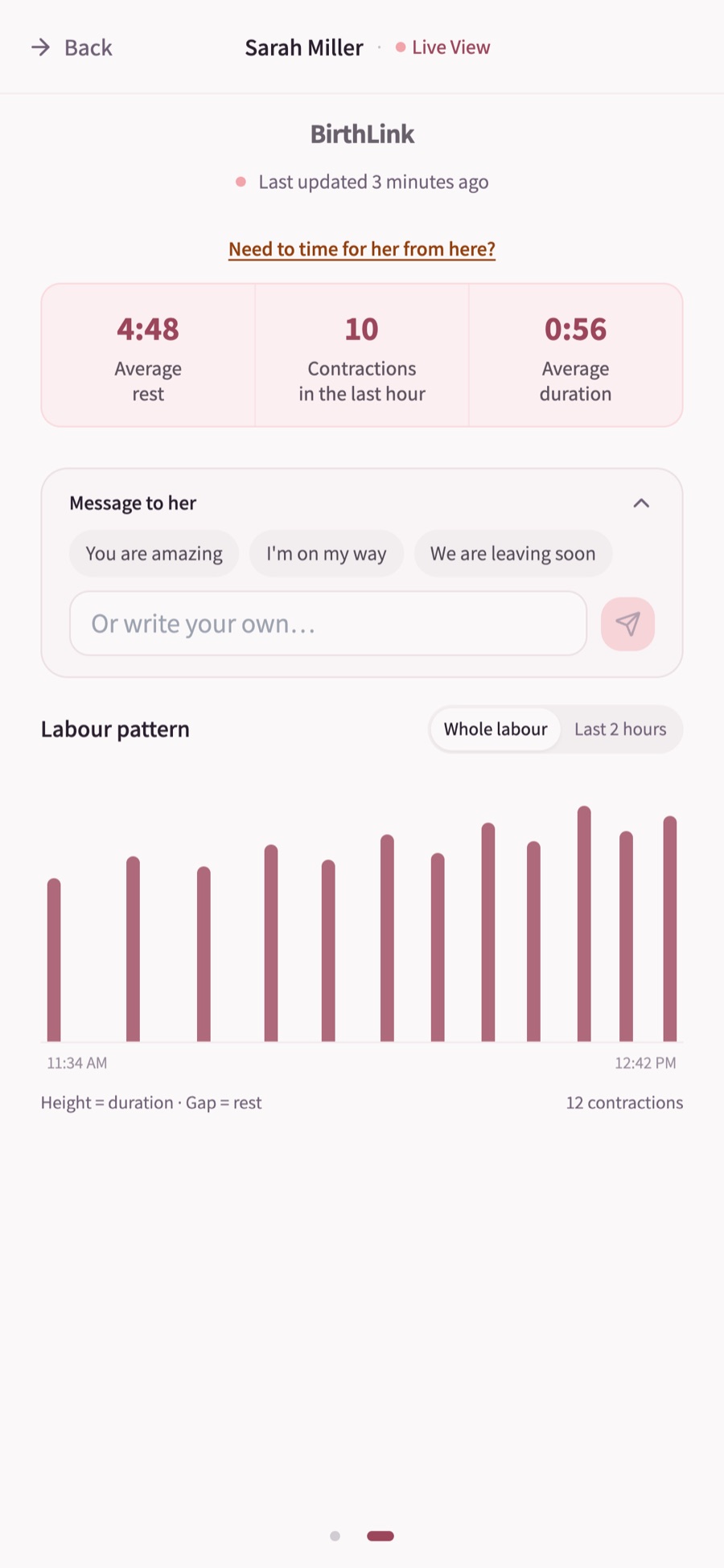
That is the same set of numbers you would otherwise be assembling from screenshots, except it updates by itself and it shows the direction of travel. Whether contractions are getting longer, stronger and closer together is a question the pattern answers and a single message never can.
What it does not do is interpret. BirthLink does not tell anyone when to go to the hospital. That conversation stays where it belongs, between your client and her care provider, and you support that plan the way you always have.
Where it fits in a doula’s work
Early labor at home. This is the main use. Hours of contractions before it is time to join her. You follow the pattern from your own bed, she rests between contractions, and you call when something changes rather than on a schedule.
Virtual support. If you support clients in another city, or offer early-labor support remotely as a package, this is the piece that makes it real rather than a phone call every hour. There is a full guide here: how to offer virtual doula support in early labor.
On the way, or at another birth. You are finishing one birth while a second client’s contractions start. You can see both, and you can tell your backup exactly where things stand instead of forwarding screenshots.
In the room, with intermittent monitoring. Sometimes the timer is simply the cleanest way to keep a record while you keep your hands free.
What doulas say after using it
These are from doulas who used BirthLink at real births. There are more on the testimonials page.
“During early labor, seeing both the frequency and duration of the contractions helps me understand whether labor is becoming established and whether there is still time before we need to leave for the hospital.”
“It helped me understand the laboring person's contraction pattern, and to know even in the middle of the night whether contractions were continuing or had stopped.”
“I have been loving being able to have a live view of my clients' contractions rather than having to wait on screenshots.”
How BirthLink compares with other ways of sharing contractions
Who it was designed for
- Timer app plus screenshots:
- The woman in labor
- Apps with a share link:
- The woman in labor and her partner
- BirthLink:
- The doula and her client together
What the doula sees
- Timer app plus screenshots:
- Whatever she sends, when she sends it
- Apps with a share link:
- Varies by app
- BirthLink:
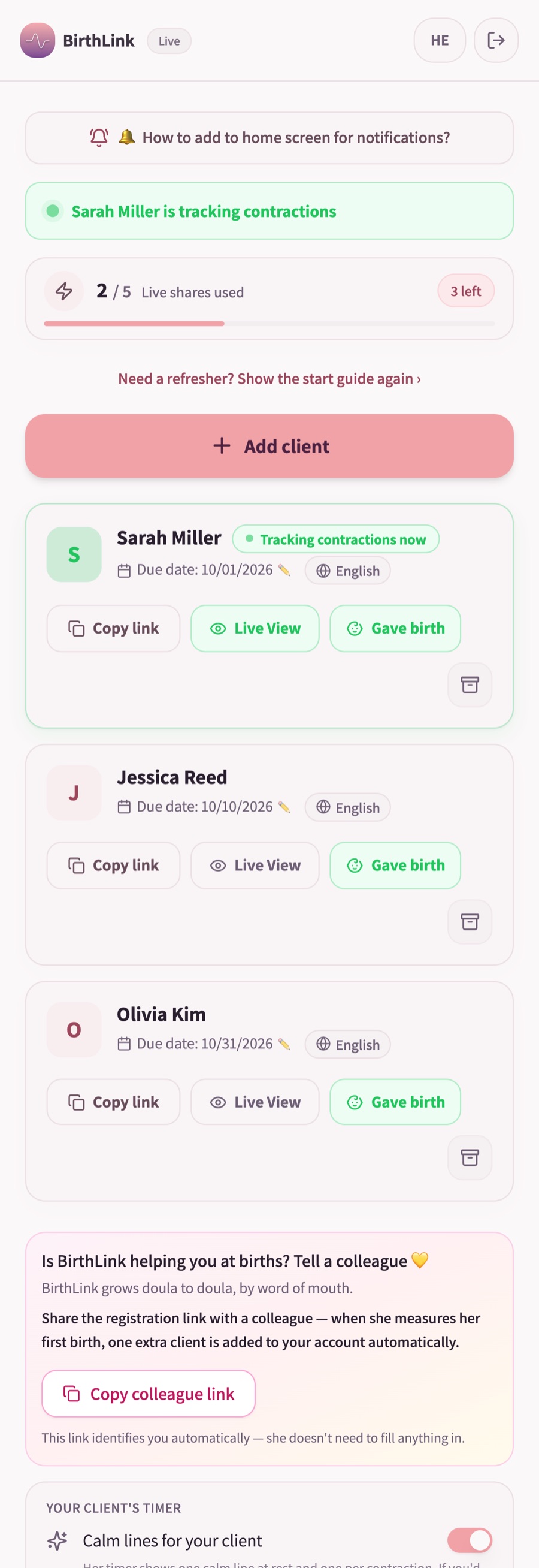
- Every client on one dashboard, live
Client installs an app
- Timer app plus screenshots:
- Yes
- Apps with a share link:
- Usually
- BirthLink:
- No, a link in her browser
Notifications to the doula
- Timer app plus screenshots:
- None
- Apps with a share link:
- Varies by app
- BirthLink:
- Available when she starts, stops or restarts timing
Doula can time for the client
- Timer app plus screenshots:
- No
- Apps with a share link:
- Varies by app
- BirthLink:
- Yes
Client can note waters broke, fix a contraction
- Timer app plus screenshots:
- No
- Apps with a share link:
- Varies by app
- BirthLink:
- Yes
Price for the doula
- Timer app plus screenshots:
- Free, paid in screenshots
- Apps with a share link:
- Varies by app
- BirthLink:
- First 5 clients free, then $15 a month for unlimited clients
| A regular timer app plus screenshots | Consumer apps with a “share” link | BirthLink | |
|---|---|---|---|
| Who it was designed for | The woman in labor | The woman in labor and her partner | The doula and her client together |
| What the doula sees | Whatever she sends, when she sends it | Varies by app | Every client on one dashboard, live |
| Client installs an app | Yes | Usually | No, a link in her browser |
| Notifications to the doula | None | Varies by app | Available when she starts, stops or restarts timing |
| Doula can time for the client | No | Varies by app | Yes |
| Client can note waters broke, fix a contraction | No | Varies by app | Yes |
| Price for the doula | Free, paid in screenshots | Varies by app | First 5 clients free, then $15 a month for unlimited clients |
The middle column is a real option and I am not going to pretend otherwise. If a client already loves an app with a share link and you only need a view of one birth, use it. BirthLink is for the doula who does this every month and wants one place, her own notifications, and the ability to step in and time.
What it costs
Your first five clients are free, with no credit card. After that, BirthLink Live is $15 a month, or $150 a year, for unlimited clients, and you can cancel any time. If you attend only a few births a year, you can instead pay $10 per birth with no subscription.
Your client never pays and never installs anything. I ask doulas to present it to her the way I do: as something you are giving her, not something she has to set up.
Frequently asked questions
Does my client need to download an app?
No. She opens the private link you send in her phone's browser and times there. Saving it to her home screen is optional.
Can I see my client's contractions in real time on my own phone?
Yes. Every contraction she records appears on your phone as it happens, with its duration, the interval, and the recent pattern. You can also be notified when she starts, stops or restarts timing.
Can the doula time contractions for the client?
Yes. You can start and stop contractions from her live view on your phone when she is too far into labor to tap, or when you are with her and want to keep the record yourself.
Does it work on iPhone and Android?
Yes. It runs in the browser, so your client installs nothing. On an iPhone, adding BirthLink to your own home screen makes your notifications more reliable.
Can I use it with several clients at once?
Yes. Each client has her own link and her own view on your dashboard. Unlimited clients are included in the monthly price.
Is the timing saved?
Yes. Every contraction she records is saved, and her live view keeps showing the latest session after she stops timing.
Is BirthLink a medical device?
No. It times contractions and shares them between a client and her doula. It does not interpret them and does not give medical advice. Decisions about when to call a provider or go in stay with your client and her care team.
Is this the same as a contraction timer for the mother?
It includes one. Your client uses the timer from the link you send. The difference is that you see what she times, live, and can time for her when needed.
The timer your client uses is described on the timer page.
BirthLink was made by a practicing birth doula. If you have a question I have not answered here, write to me at sivan@birthlink.app.
Try it with your next clientQuestions? Write to sivan@birthlink.app

